June 3, 2014

Learn how to use Twitter in 5 mins!


Hi guys. Its amazing to know that over 500 million users have account on twitter. This proves it is really a very popular social networking site. But only 140 million use it on a regular basis, which shows its learning curve is rather confusing to people.

So today I'll try to give you the basics of twitter. See the picture above. I've numbered all the elements of twitter upto 20 and I'll explain you their meaning one by one below:

What is twitter?
It is an online social networking and microblogging service that enables users to send and read short 140-character text messages, called tweets

  1. Photo: this photo is your identity on twitter and appears with your tweets.
  2. Your name and below that @xyz is your username on twitter.
  3. Number of tweets you've done so far.
  4. Number of people you're following.
  5. Number of people following you.
  6. Create your new tweet right from here.
  7. The current trending topics.
  8. This section show you tweets/retweets from the person you're following.
  9. Bases on popularity and your interests, this section suggests you whom to follow.
  10. This is the footer of this webpage showing you quick links of twitter. Normally we never use them.
  11. Just like facebook, this section shows you new notifications related to you.
  12. What's happening now, tailored for you. The current happenings which you might be interested in based on your curiosity over time which twitter observed.
  13. Your account page, your tweets, people you follow. Everything related to just you.
  14. Search on twitter from here.
  15. Send a private message from here.
  16. View all settings that you can regulate from here.
  17. Compose a new tweet from here.
  18. Reply: this is same as facebook's comment feature. You can write you own view on the tweet.
  19. Retweet: this is same as facebook's share feature. When you retweet, people following you will see this tweet on their twitter home page.
  20. Favorite: this is same as facebook's like feature. People following you will see this tweet as marked as favorite by you on their twitter home page.
That's all friends! Hope now you'll not feel alienated on tweeter. Happy tweeting :)

May 31, 2014

Mother Bird: Live on Windows Phone Store!!


Mother Bird for Windows Phone is here!!
Just click on the link to go to Windows Phone Store and play my first game for windows phone :)

May 17, 2014

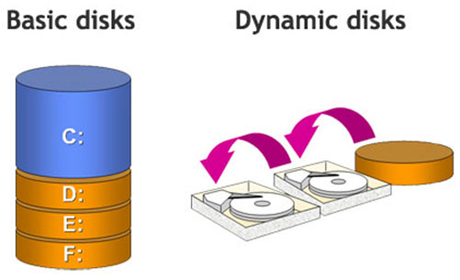
How to convert dynamic disk back to basic disk

Recently I installed windows 7 on my laptop. While installing I came to know that I can't make more than 4 disk partitions. After successful installation, I decided to shrink one of the highest space drive. Windows said I needed to convert the drives to dynamic for this purpose. I did that. Later that day I wanted to repartition my drives and install windows 8.1, windows restricted me to do so because the drives were dynamic. So after hours of struggle I was able to convert them back to basic and I think this information might me helpful for someone someday, hence posting it here:


  1. Boot your system with windows installation dvd in it.
  2. Click Repair your system.
  3. Open command prompt.
  4. Type diskpart
  5. Type list disk
  6. Type select disk 0
  7. Type clean
Repeat steps 6 and 7 for all the disks which you have. That's all! Your factory fresh system is in your hands :)

May 4, 2014

The other side of Partitioning SD card to increase android's RAM


Partitioning SD card does free up a portion of internal memory for use as RAM. However, there are many not so positive side effects:
  1. SD card needs re-partitioned and all your SD card data will be lost during process.
  2. SD card speed rating plays a crucial role in the system's overall performance and stability.
  3. If you remove SD card, phone will stop working.
  4. SD card's life will get reduced and there will be extra wear and tear over time as SD cards, unlike EPROM in flash memory, aren't designed for many write cycles.
  5. Device will not be stable. You may see application not responding more often.
  6. If data corruption happens on SD card, phone will become inoperable, requiring a complete re-flashing of ROM and loss of all data.

May 1, 2014

Beats Audio: Revolutionize your android music experience!


So what do these apple fans brag about most? Of course the music quality. Even though this is pretty much the only thing they can boast about, seems now android lovers are going to snatch this privilege too haha!

A much heard brand in classy music industry: beats audio drivers is up for grabs. A number of phones sporting beats audio were released by HTC. Beats audio is a branded equalizer that enhances the overall music listening experience. XDA developers have turned this into an app for all android phone owners :)

Your devices must be rooted in order to savour the flavours of this amazing driver. Moreover, if after installing you feel you were better of stock, simply uninstall.